

How do I get started?
The first step in recreating your website with the Website Builder is by installing a Website Builder template.To install your template
- Open the Website tab from your Dashboard.
- Click Template Store.
- Click your desired template.
- Then, click Add to saved templates:
Website Builder Basics
Before you begin rebuilding your website pages with the Website Builder, let’s discuss the structure of your page. Pages built with the Website Builder and Kajabi Pages are made up of: Each section of your page is made up of specific Blocks. For example, the Offer Storefront includes a Text Block and three Offer Blocks: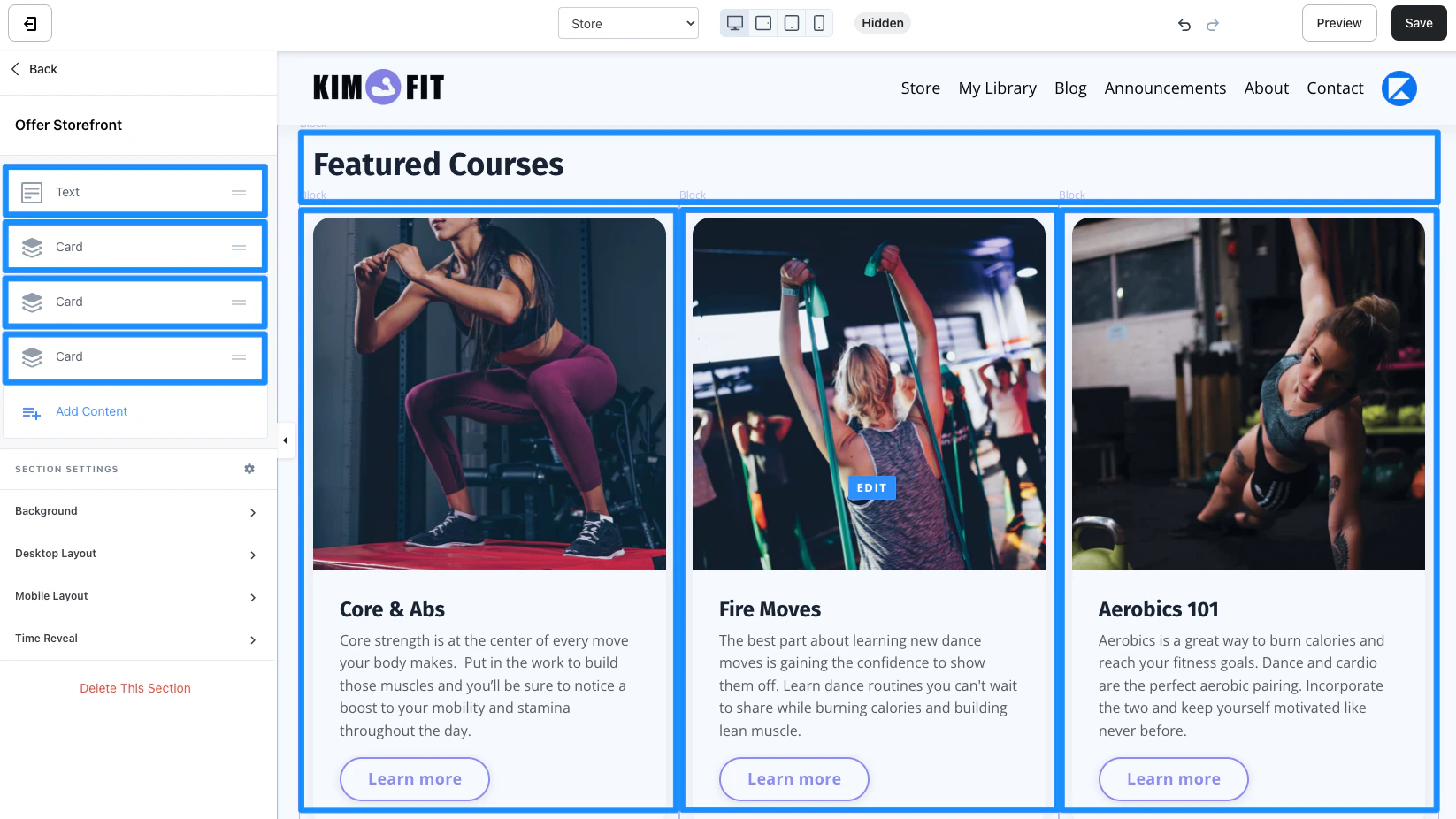
Note: Although any Section can be replicated by adding or removing block types to a Section, the appearance of your Section may vary due to the optimized design Kajabi has built for you with each preset Section.
Customizing your System Website Pages
Build your website with the many standard website pages available with the Website Builder.Template Home
The template home is your website homepage; the face of your online business. When visitors enter your URL this is the page that will appear unless you have changed your settings in your Site Details. Learn moreLibrary
The Library is your customers’ home base. Each customer’s Library is unique and only contains the Product(s) they have purchased or have been granted. With the Website Builder you can design the look and feel of your customer Library to reflect your brand. Learn moreStore
An online store is a great place to showcase your Offers and provide an easy-to-access location for potential customers to peruse your content. With the Website Builder you can create a uniquely branded store that is truly yours. Learn moreLogin
For your customers to access their Products in their Library page, they must first go through the Login page with their specific login credentials. Design your Login page with the Website Builder to optimize your users experience with your site at every touch point. Learn moreThank You
Design your default thank you page to appear after every purchase. Elevate the design of your default thank you page with the Website Builder. Learn more404 Page
Personalize your users experience with your site even when they encounter an error page by including custom sections with images, text, links, and custom code with the Website Builder. Learn moreBlog
Design your Blog Homepage with rich editing capabilities to build a Blog Homepage that best fits your brand and business. Learn moreBlog Post
Customize the look and feel for all of your blog posts with one easy-to-edit blog post design page available with the Website Builder. Learn moreBlog Search
Custom design your blog search page to provide your blog visitors a unique, branded experience as they explore and search through your blog. Learn moreMember Directory
Provide a space for your customers to build connections with like-minded people directly from their user account with the Member Directory. Learn moreNote: As a logged in site admin, your member directory will display every customer on your site. However, for customers to display in your Member Directory page to other customers, they must opt-in through their customer Settings. Learn more
Announcements
Streamline how you manage your Product and Site announcements all while giving your customers one easy-to-access location to view your announcements with the Announcement page. Learn moreAbout
Share your unique story with your site visitors and position your brand and business by designing your About page with the Website Builder. Learn moreContact
Create an easily accessible location for your visitors to get in touch with you and your team by designing your Contact page with the Website Builder. Learn more Standard website pages cannot be duplicated. Instead, create landing pages to match your brand and website. Learn moreActivate your template
Each Website template can be customized independently of each other. The activated template will be the only template visible to your visitors. This allows you to design your website behind-the-scenes and launch with an all-new, completed look. After customizing your newly updated website, activate your template to launch your look:- Return to your list of Saved Templates.
- Hover over your template.
- Select Set to live template: