Beta:
This feature is currently in a Closed Beta and is being tested by a select group of Kajabi users. If you have questions or concerns about this feature, reach out to support@kajabi.com.
Publishers
Publishers monetize their email list by featuring sponsored content from other Heroes. Before setting up your profile, make sure you have:- An active Kajabi account with at least one connected site
- At least 1K email list subscribers on the site you want to connect
Set up a Publisher profile
Note:
You can set up a Sponsor profile at any time after creating your Publisher profile. You can also create a Publisher profile for each site in your Kajabi account.
- Go to Amplify and select Publisher from the role selection screen.
- Choose which Kajabi site you want to connect. If you have multiple sites, select the one whose audience you’d like to monetize.
- Fill out your Publisher profile. Sponsors will see this when deciding whether to work with you:
- Business name: Pre-filled from your site
- Owner name: Pre-filled from your site
- Bio: Pre-filled from your site
- Niche: Choose from categories like Health & Fitness or Business & Marketing
- Set your pricing. Your email stats are pulled automatically. These include total subscribers, largest send size, median send size, and email broadcast count over the last 180 days for email broadcasts delivered to over 1K subscribers. Configure the following:
- Audience size: The number of subscribers you’ll send ads to (cannot exceed your actual subscriber count)
- Send fee: What you charge per sponsored send
- You’ll also see a Projected Annual Revenue Estimate automatically calculated based on your audience size, your CTR at that audience size, industry standard conversion rates, and a target return for the sponsor
- Preview your profile to confirm how it appears to Sponsors, then click Create Profile & Continue to Home.
Note:
Amplify takes 20% as a commission fee.
Sponsors
Sponsors pay to promote their products in other Heroes’ email broadcasts. Before setting up, have the following ready:- An active Kajabi account
- Your ad copy: a headline, description, and destination URL
- A per-send budget in mind
Set up a Sponsor profile
- Go to Amplify and select Sponsor from the role selection screen.
- Optionally import your profile information from a Kajabi site, or fill everything in manually:
- Business name
- Owner name
- Bio
- Niche
- Create your first campaign:
- Headline: The main attention-grabber. Lead with the outcomes you provide
- Body: 2-3 sentences describing what you’re offering, who it’s for, and why it’s credible or urgent
- Call to action: Button text (defaults to “Learn More”). A short action phrase displayed on a button. Being specific on what happens when they click converts better, for example Save your free seat or Watch the full system
- Destination URL: Where people go when they click your ad
- Max budget per send: The most you’re willing to pay for a single sponsored send. This helps recommend publishers in your price range, but you can still request any publisher regardless of price
- Preview your Sponsor profile and ad, then click Create Profile & Continue to Home.
Manage your settings
Both Publishers and Sponsors can update their profile and campaign information at any time from Settings. Website and social media links can be added after onboarding through your Settings. They are automatically pulled in from your site’s brand settings if available. These are displayed on your profile preview to other experts, so they can learn more about you and confirm you’re a good match.| Setting | Publisher | Sponsor |
|---|---|---|
| Profile (Business Name, Owner Name, Bio, Niche, Website & Social Links) | Yes | Yes |
| Pricing (Audience size, Send fee) | Yes | — |
| Ad campaign (Copy, Preferred Budget) | — | Yes |
FAQs
Can I be both a Publisher and a Sponsor?
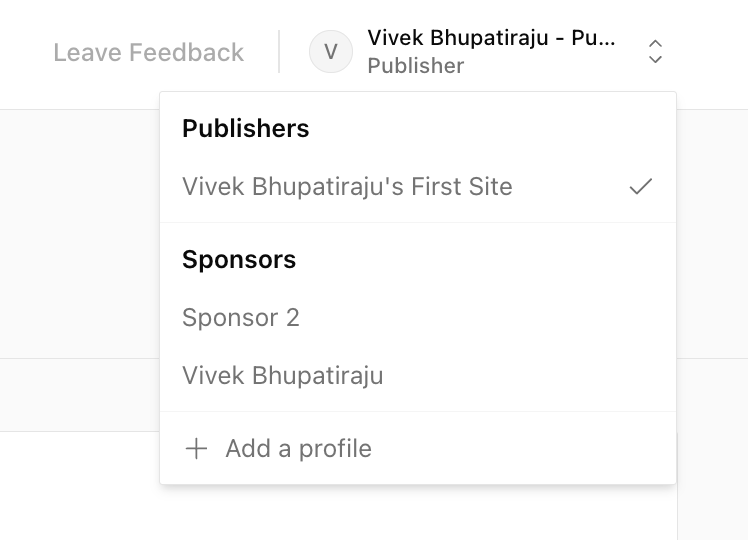
Yes. During onboarding you’ll start by creating either your Publisher or Sponsor profile first. After onboarding, select Add a Profile (on the top right corner) to create the other.