Create a Landing Page that automatically detects the visitor’s device and redirects them to the appropriate app store. This ensures iOS users go to the Apple App Store, Android users go to Google Play, and desktop users are directed to a fallback page.

Create a Landing Page

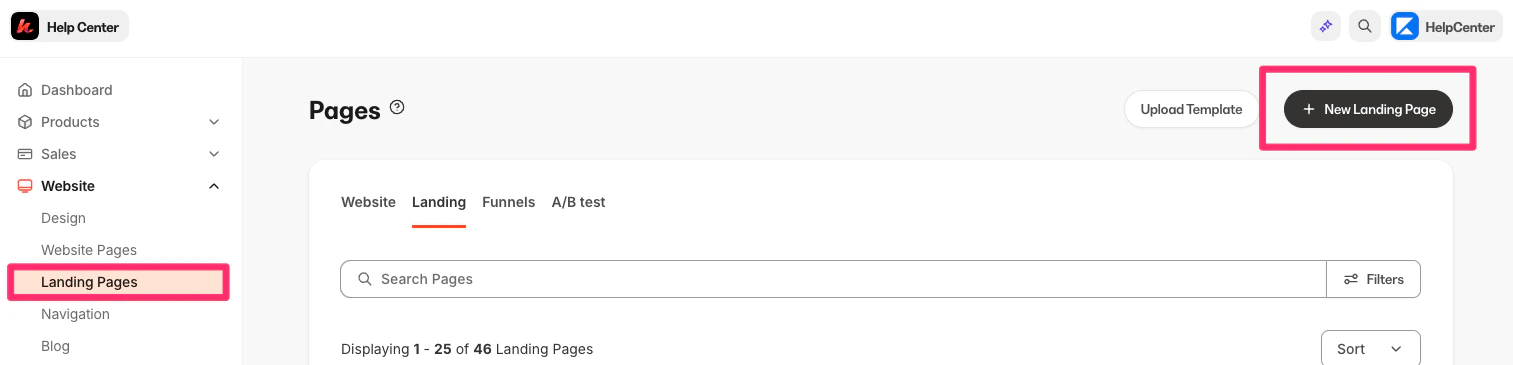
  1. Log into the Kajabi Dashboard.
  2. Navigate to Website.
  3. Then, Landing Pages.
  4. Click New Landing Page:
Kajabi_-__admin_sites_135263_landing_pages.png
  1. Select a template (a simple/blank template works best for redirect pages).
  2. Name the page and click Create.

Design the Landing Page

Tips for designing the Landing Page:
  1. Keep the design minimal since users will be redirected quickly.
  2. Add a simple heading (e.g., “Welcome”)
  3. Add a short message (e.g., “Preparing to redirect you to the appropriate destination…”)
Learn more about creating pages.

Add the redirect code

After designing the Landing Page, you will need to add the redirect code:
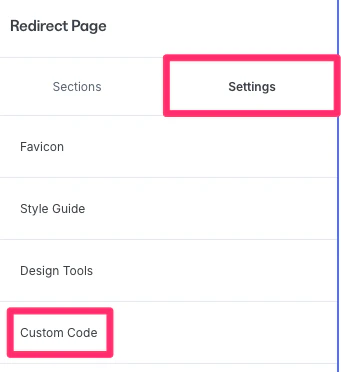
  1. Click the Settings tab in the sidebar editor.
  2. Select Custom Code:
Kajabi_-__admin_themes_2155770095_settings_edit.png
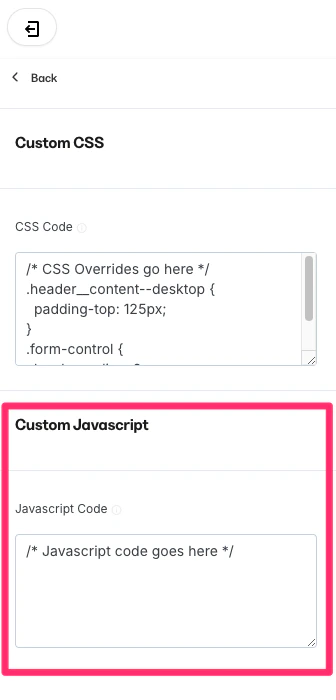
  1. Locate the Custom Javascript section:
Kajabi_-__admin_themes_2155770095_settings_edit.png
  1. Copy and paste the following code block and replace the URLs with your own:
// Wait for the page to load
document.addEventListener('DOMContentLoaded', function() {
    // Detect device
    const userAgent = navigator.userAgent || navigator.vendor || window.opera;
    
    // Set up the redirects
    if (/iPhone|iPad|iPod/i.test(userAgent) && !window.MSStream) {
        // iOS device
        window.location.href = "https://apps.apple.com/gb/app/kajabi-branded-app/id6502643192";
    } else if (/android/i.test(userAgent)) {
        // Android device
        window.location.href = "https://play.google.com/store/apps/details?id=com.kj2148083404.app&hl=en_US";
    } else {
        // Desktop or other devices
        window.location.href = "https://kajabi.com/features/branded-app";
    }
});
Note: The example code above is built into this landing page and has the working code above, check it out here.

Save and publish

  1. Click Save to keep and apply the changes.
  2. Click Publish to make the page live.
Now, this Landing Page link could be used behind a call to action like “Download my app” and it will redirect to the appropriate app store for app downloads.