What happens after you click send?
A series of interrelated events—some out of your control, some out of Kajabi’s control. We’ll walk you through the journey of an email in Kajabi: from the moment you draft your email, to the moment it reaches your recipient’s inbox (if it does).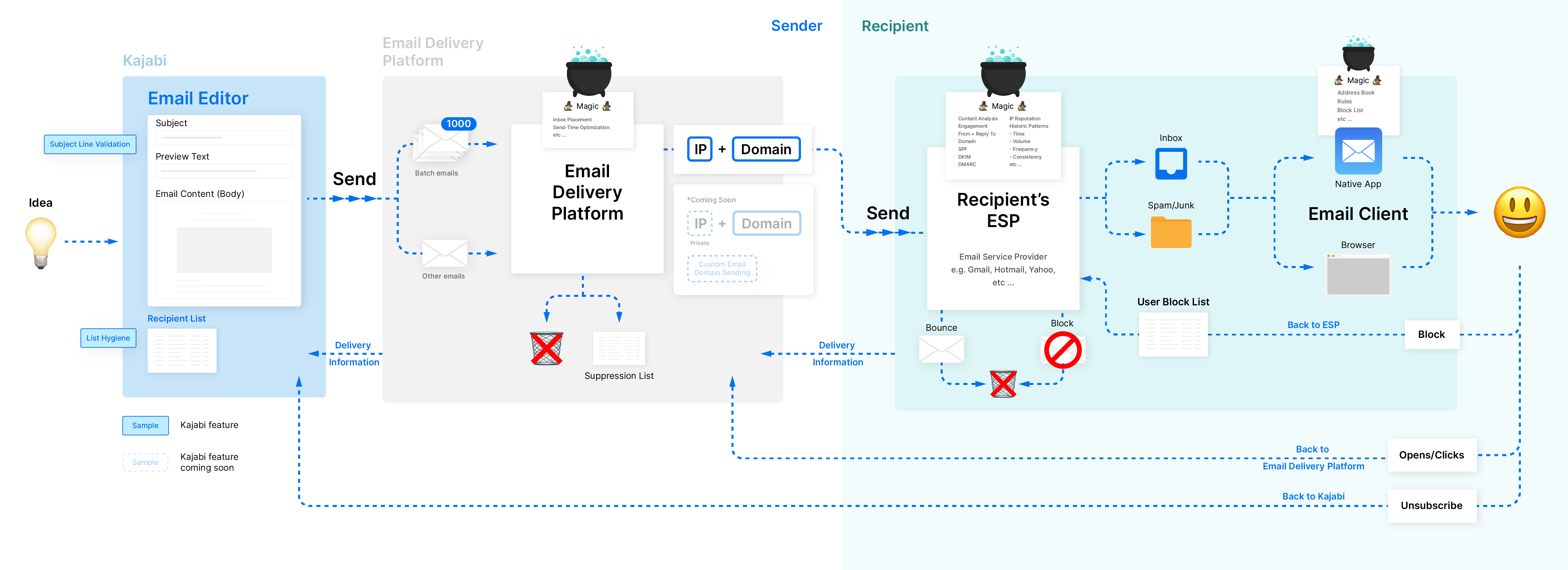
1. You draft the email
Using the Kajabi Email editor, you control the design and text of the subject line, preview text, and body. Because subject lines and body content can affect deliverability, our smart system is evaluating both:- Our email subject line validation is checking for potential spam triggers as you’re typing. If it detects a trigger, it will suggest exactly what to fix.
- Our backend email spam service is evaluating your body content before sending. Any content that’s especially egregious gets flagged and rejected from being sent. This happens very rarely.
2. You choose the audience
In the ideal scenario, you’re sending emails only to the people who interact with them. The more your recipients open, click, reply, and forward your emails, the more solid your reputation will be. Email list hygiene is all about maintaining a clean, high-quality list proactively. You can use Kajabi capabilities like requiring a double opt-in, as well as unsubscribing and removing inactive contacts and emails that are permanently bouncing. (Your email automatically includes an opt-out to comply with anti-spam laws.) We have developed capabilities like email address validation that will automate more of these cleanup tactics.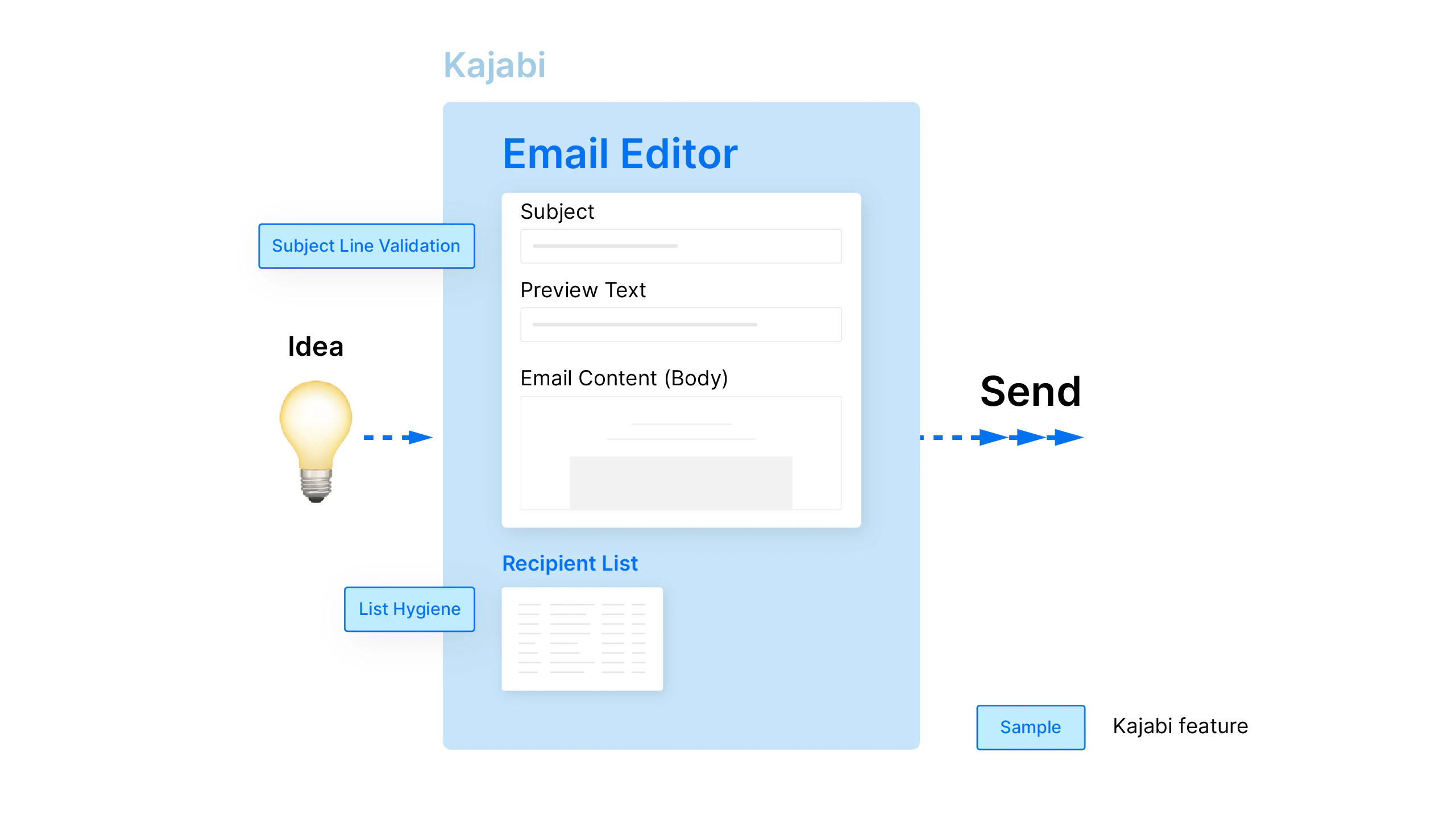
3. You click send or schedule
This triggers a chain of events that’s seemingly invisible. This includes packaging up your message and recipient list so it can be processed by Kajabi’s servers.4. Kajabi hands off your email
Our email delivery platform’s cloud-based infrastructure scales with growing businesses and stands out from other ESPs because it’s state-of-the-art. More than 150,000 companies worldwide—including Shopify, Slack, and Lyft—use our email delivery platform.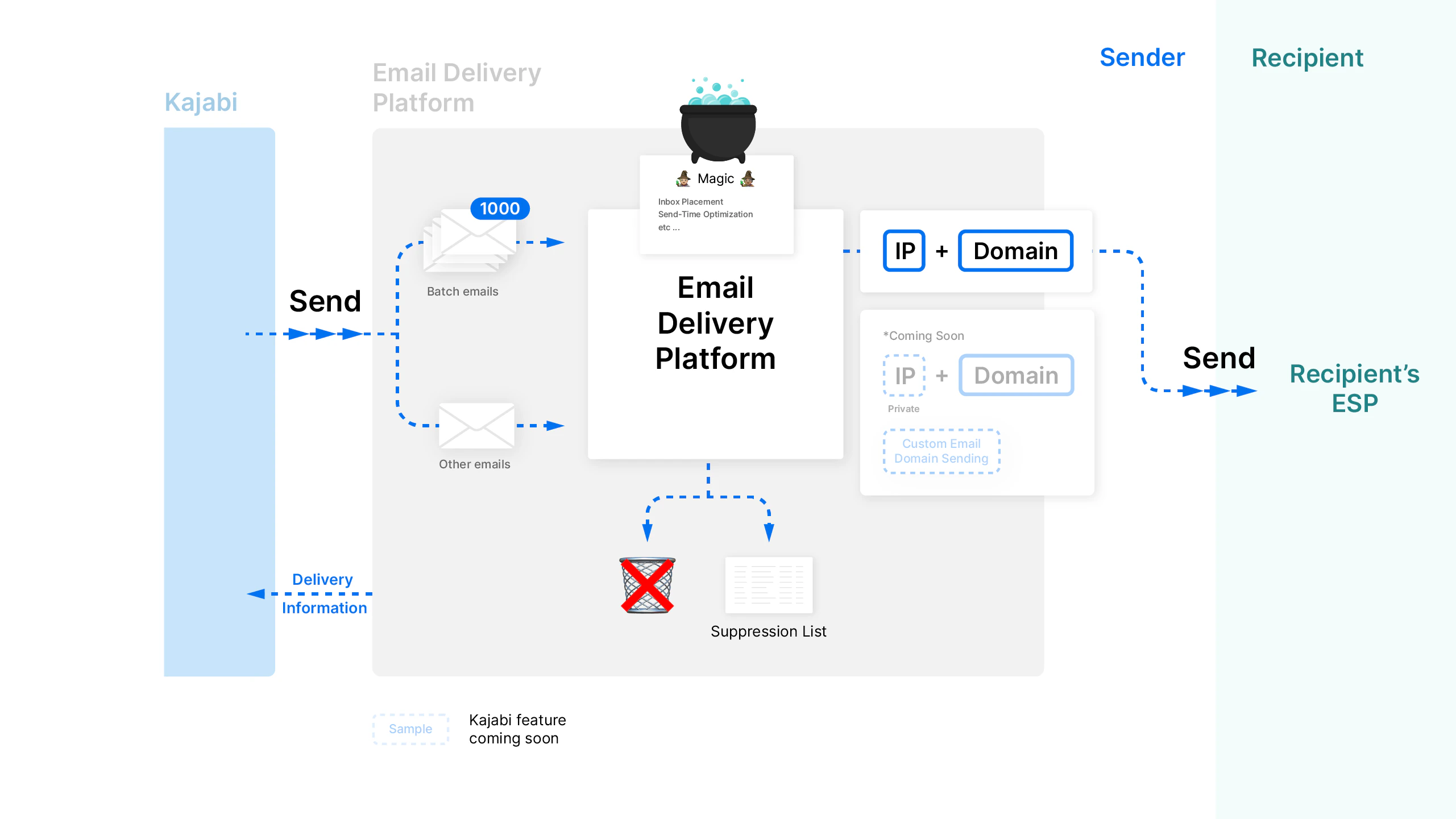
5. Kajabi divides broadcasts into batches
Using Lightning Broadcast technology, Kajabi splits emails going to big recipient lists into separate chunks of 1000 recipients each. This helps rapidly speed up email delivery.6. The email delivery platform devises a plan
Sophisticated technologies execute email delivery processes in ways that aren’t always clear-cut. At Kajabi, we’re working on implementing certain protocols like inbox placement, send time optimization, and various ways to warm up IP addresses. Email throttling controls the number of emails sent to one ISP or remote server at one time. Without mechanisms to control how quickly emails get released, the emails are more likely to be flagged as spam. Suppression lists are one of those many processes. If a recipient’s address is invalid, the email will hard bounce every single time. Our email delivery platform will filter out those emails automatically by putting them on a suppression list.7. The email goes out via Kajabi’s dedicated IP addresses
At this point, we’re at a bridge that connects the email message en route, the sending domain, and the sending IP address. All Heroes get the benefit of reputable shared domains and shared IPs. If you’re a business starting out or don’t send high-volumes frequently, you can leverage Kajabi’s elevated sender reputation. If you would prefer to use your own Custom Email Domain, however, you can! Learn how to connect your Custom Email Domain to Kajabi.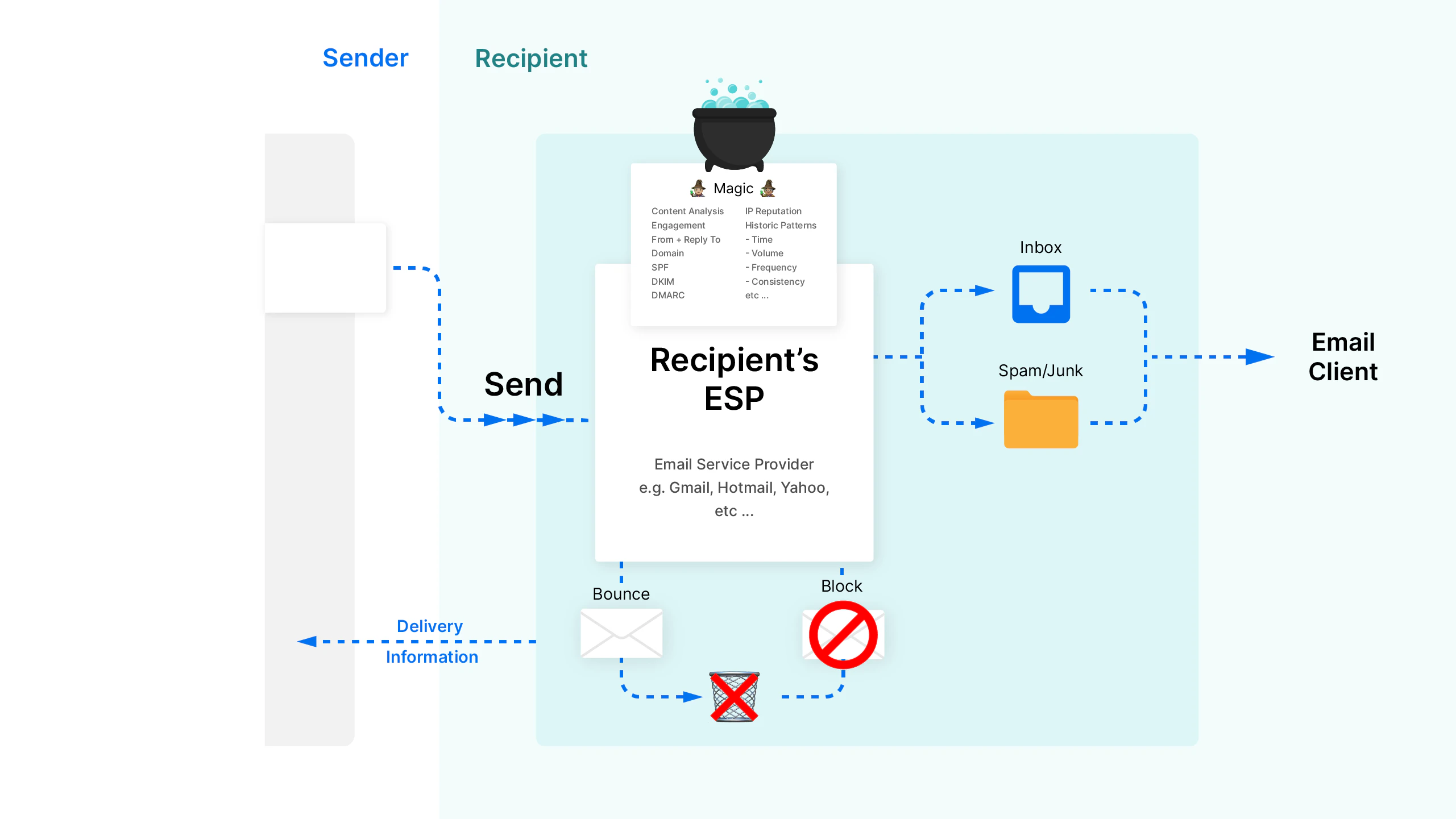
8. The email goes to the recipient’s ESP
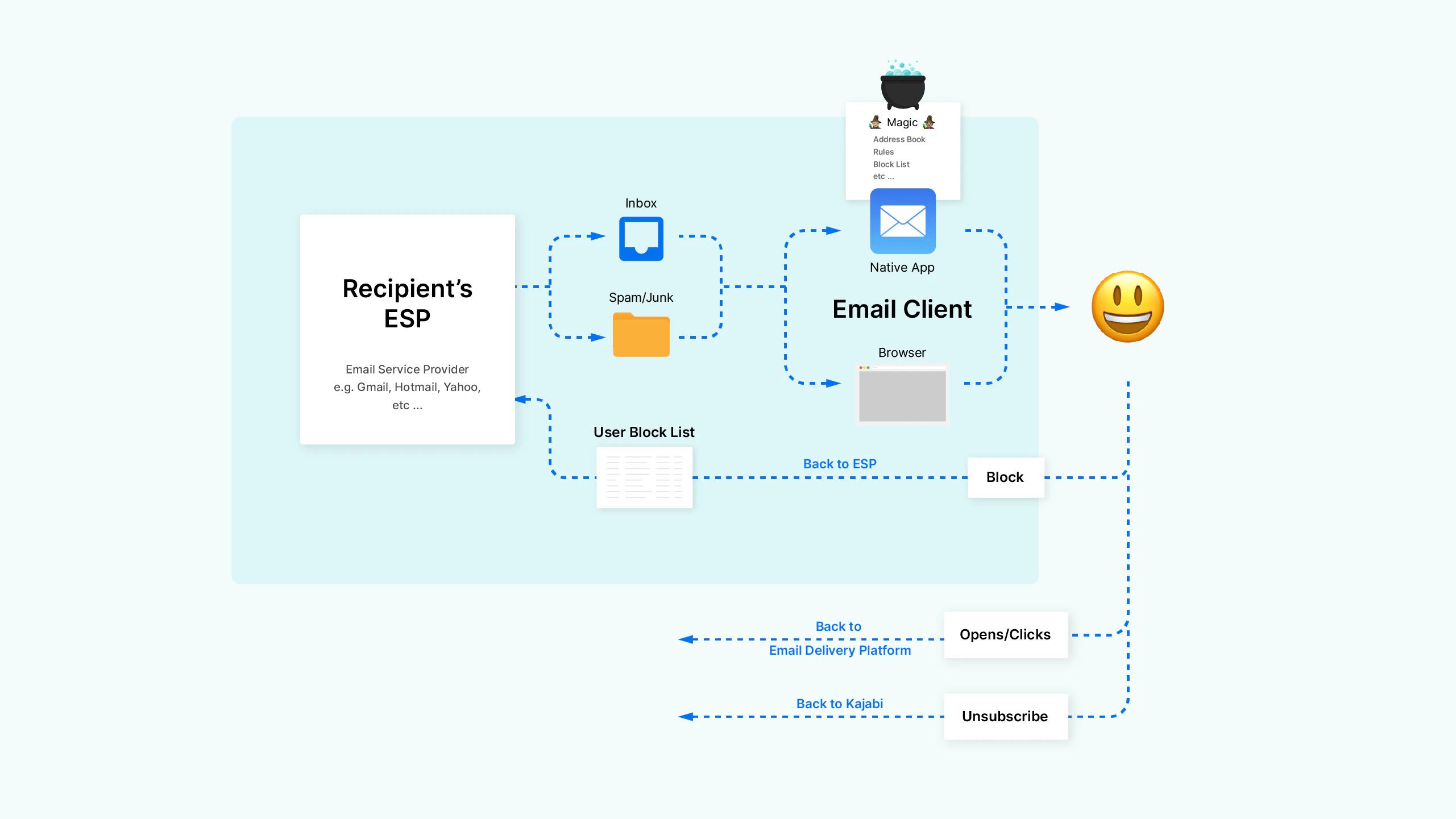
Your email broadcast will likely go to a handful or a dozen different ESPs depending on your list, e.g. Gmail, Hotmail, Yahoo, and other providers.9. Spam detection systems evaluate the email
Every ESP has its own proprietary algorithm that’s constantly analyzing incoming emails. Neverending changes to these search algorithms are inevitable as spammers discover loopholes and slip through spam filters. At this stage, Kajabi and its users don’t have much visibility of the ins and outs. We know that IP reputation plays a major role in the algorithm. Consider the practically unlimited details about email that an ESP could potentially assess:- The ratio of images versus text
- Previous engagement between the sender and specific recipient
- Overall engagement from all recipients
- The “reply to” address and how it relates to the source domain
- Historical sending patterns
- IP/domain reputation
- SPF: Sender Policy Framework checks the DNS record and prevents unauthorized sources from sending emails from your domain.
- DKIM: DomainKeys Identified Mail uses public-key cryptography.
- DMARC: Domain-based Message Authentication, Reporting, and Conformance tells the receiver what to do if an email does not pass SPF or DKIM authentication.