

Overview
Curious about switching to Kajabi Payments? Review the most frequently asked questions below to understand how Kajabi Payments can streamline payment processing and grow your business.What is Kajabi Payments?
Kajabi Payments is a built-in payment processor that eliminates the need for external payment services. It supports all major credit and debit cards and includes fast and flexible payment methods such as Apple Pay, Google Pay, and Buy Now, Pay Later options like Afterpay and Klarna. These make the checkout process easier and can help boost sales by accommodating more customer preferences. Kajabi Payments integrates with leading accounting software, streamlining financial workflows. It automatically calculates sales tax at checkout and simplifies managing invoices, subscriptions, and refunds. Centralizing these operations within Kajabi ensures a secure and efficient solution for all financial needs. Check out the screenshot below to see how checkout pages look after making the switch: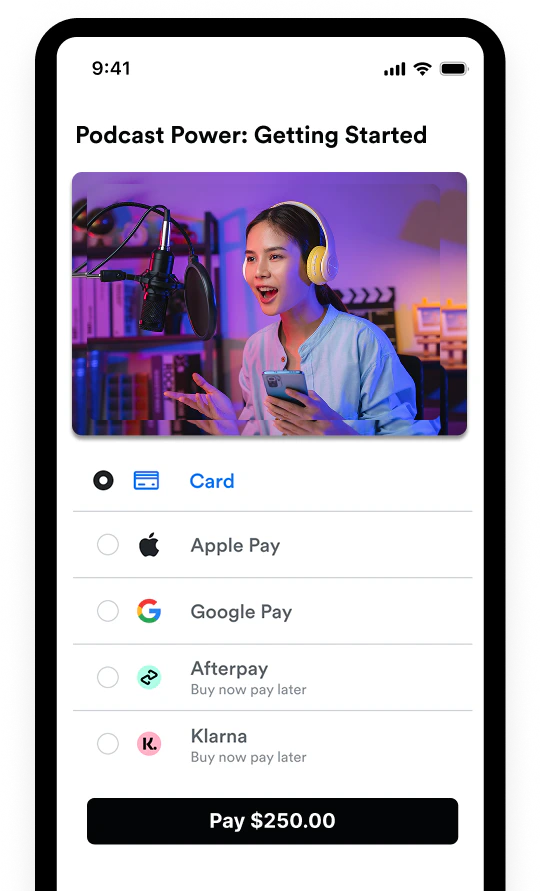
What are the benefits of Kajabi Payments?
Kajabi Payments offers three key advantages:- Complete commerce solution - Handle all financial operations from the dashboard—manage transactions, collect sales tax, send invoices, issue refunds, and oversee subscriptions with ease. This makes financial processes more efficient and ensures greater accuracy across business operations.
- Expanded payment options - Kajabi Payments supports a wide range of payment methods, including major credit and debit cards, Apple Pay, Google Pay, and Buy Now, Pay Later options such as Afterpay (AKA Clearpay in the UK) and Klarna. Broadening payment offerings meets customer needs and creates a smoother checkout, leading to boosted conversion rates.
- One-stop payment processing - Consolidate all payment processing in one place, eliminating the hassle of third-party tools and various systems. This centralization simplifies managing finances, allowing more time to focus on what matters—growing a business with Kajabi’s comprehensive marketing and development tools.
What is the benefit of using Kajabi Payments over Stripe or PayPal?
Kajabi Payments is purpose-built for Kajabi Heroes to support an all-in-one experience. It includes exclusive features only available via Kajabi Payments, such as Apple Pay, Google Pay, Afterpay, Klarna, Xero, Quickbooks integrations, and the option to calculate sales tax on offers.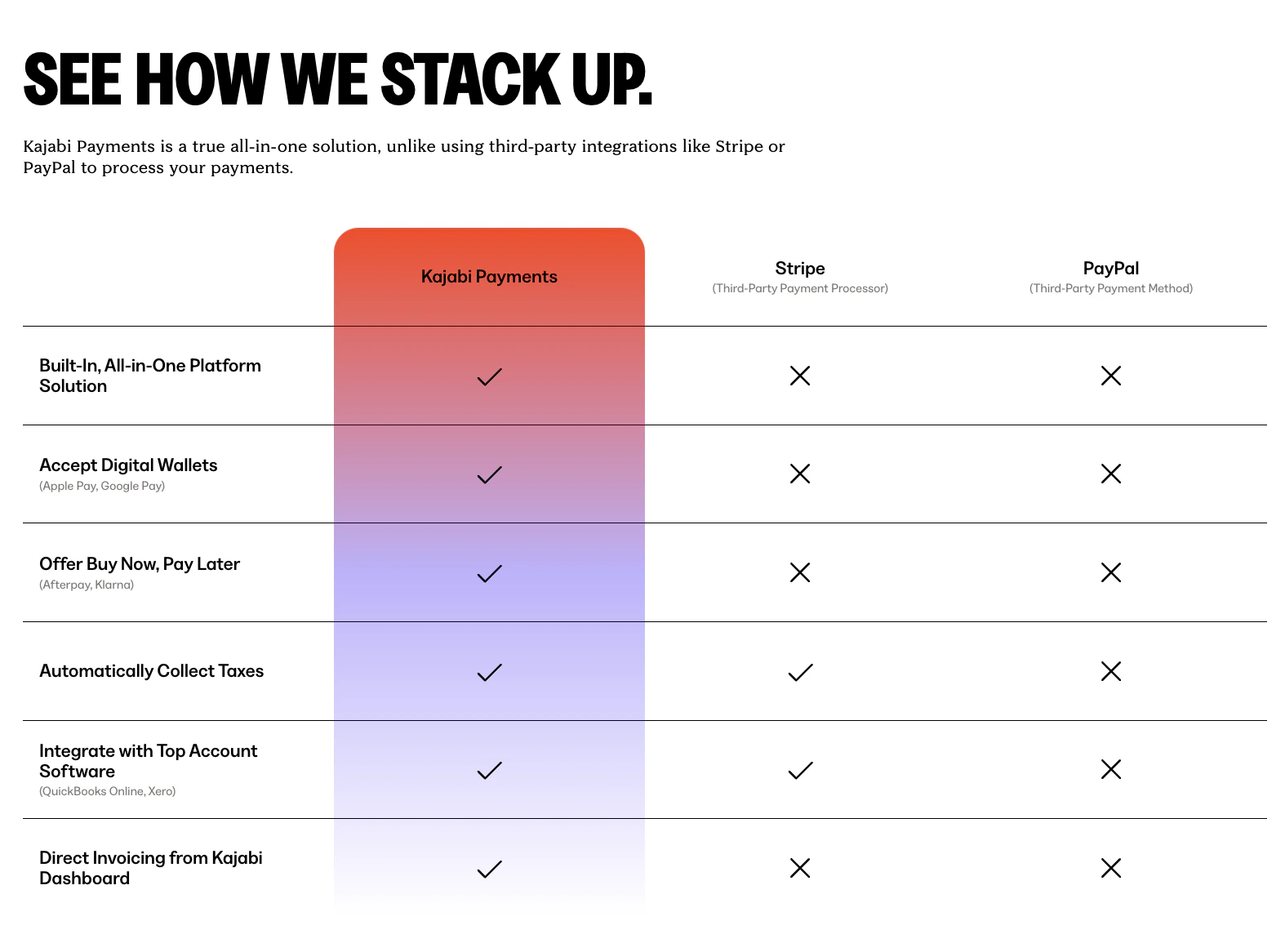
If I make the switch, what happens to Stripe or PayPal?
Stripe will remain connected to the Kajabi account and continue to process any existing residual payments (see the next question for details). However, once you switch to Kajabi Payments and enable it on all of the offers, payments will come through the Kajabi Dashboard, where you can manage payments and payouts. PayPal operates as a separate payment processor and will remain unaffected by the switch.What happens to current subscriptions or payment plans?
Any existing subscriptions or payment plans will remain on Stripe and continue to bill through the 3rd party platform. Kajabi Payments will only take effect for future transactions moving forward.Does Kajabi Payments charge fees?
Kajabi Payments fees are the same as Stripe and vary by region. Check out the fee structure for each location below:- Kajabi Payments - United States Fees
- Kajabi Payments - Australia Fees
- Kajabi Payments - Canada Fees
- Kajabi Payments - United Kingdom Fees
- Kajabi Payments - Europe Fees
- Kajabi Payments - United Arab Emirates Fees
Can I manage payments in Kajabi the same way I would in Stripe?
With Kajabi Payments, you can manage all essential payment tasks, including sending receipts, pausing or canceling payments, issuing partial or full refunds, editing subscription payment amounts, manually retrying failed payments, and more—all from the Kajabi Dashboard.Can I send invoices with Kajabi Payments?
Kajabi Payments includes an invoicing feature, allowing you to send invoices directly through Kajabi.Can I collect sales tax with Kajabi Payments?
Kajabi Payments includes a Sales Tax Integration to help you automatically manage tax collection. This feature is exclusively available with Kajabi Payments.Does Kajabi Payments integrate with bookkeeping services?
Kajabi Payments seamlessly integrates with Quickbooks Online and Xero for easy bookkeeping.I am based in Canada. Can I add both my CAD and USD bank accounts?
As a Canadian Hero, you can add both a CAD and a USD bank account, with one account per currency. The bank accounts you link will determine how payments are processed and when currency conversions occur. After adding the first bank account during the Kajabi Payments setup, you can add an account by navigating to Sales tab > Payouts > Add Bank Account. Learn more about Kajabi Payments for Canada.I am based in the United Kingdom and want to add multiple bank accounts. Is this possible?
As a Hero with a business registered in the UK, you can add up to 7 bank accounts, with one account designated for each currency. These bank accounts will determine how payments are processed and when currency conversions occur. To add an additional account after initial setup, navigate to Sales tab > Payouts > Add Bank Account. Learn more about Kajabi Payments for the United Kingdom.I am based in Europe and want to add multiple bank accounts. Is this possible?
As a Hero in the select European countries where Kajabi Payments is available, you can add up to 7 bank accounts, each associated with a different currency. The bank accounts you link will determine how payments are processed and when currency conversions occur. After adding the first bank account during the Kajabi Payments setup, you can add an additional account by navigating to Sales tab > Payouts > Add Bank Account. Learn more about Kajabi Payments for Europe.Additional Kajabi Payments resources
- Kajabi Payments
- Kajabi Payments: Setup & Onboarding
- Understanding Kajabi Payments: What You Really Need to Know
- Digital Product Sales Tax: A Guide for Content Creators