

- Tracking how many payment plans are active, paused, or past due
- Identifying pending cancellations that may affect future revenue
- Monitoring payment behaviors across specific offers that use payment plans
Data presented
Visual charts
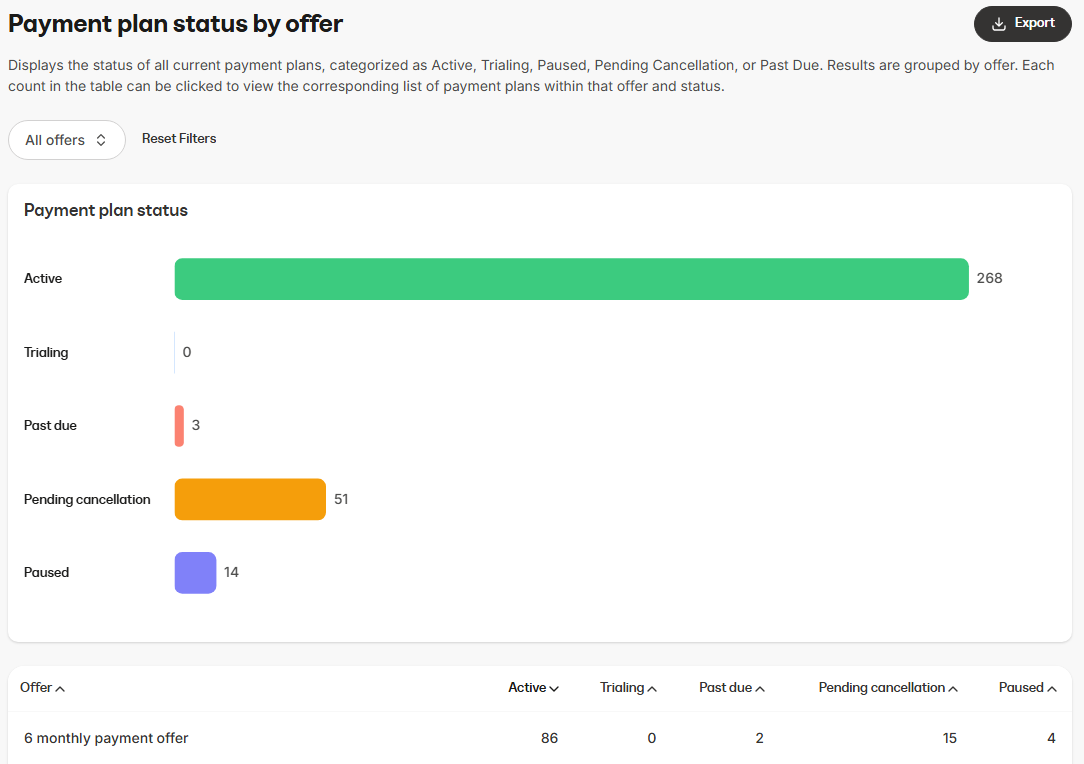
- Bar chart: Shows the number of payment plans broken down by status (Active, Trialing, Past due, Pending cancellation, Paused)
Data table
- Offer name: The name of the product or service linked to the payment plan
- Active: Number of customers actively making payments
- Trialing: Number of customers currently in a trial before the plan activates
- Past due: Number of customers who have missed payments
- Pending cancellation: Number of payment plans scheduled to be canceled
- Paused: Number of payment plans currently paused
How to use the report
You can customize the data displayed in the report using several controls.Controls
- Offer selection: Choose whether to view data for multiple offers or focus on a specific offer
- Offer click through: Each count in the table can be clicked to view the corresponding list of payment plans within that offer and status
Export information
When you export the Payment plan status by offer report, the resulting file will include the same columns and reflect any filters you have applied. This ensures the data in the export matches what is displayed in the report:- Offer name
- Active
- Trial
- Past due
- Pending cancellation
- Paused