Activate Affiliate commission in an Offer
- Open the Sales tab from your Dashboard.
- Click Offers.
- Select the Offer you wish to edit.
- Open Settings.
- Toggle on Activate Affiliate commissions for this Offer.
- Enter the Percentage or Fixed Amount you are willing to offer your affiliates when an affiliate transaction occurs.
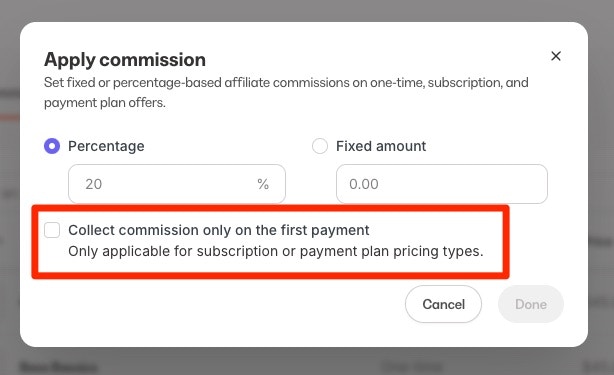
- Use the check box if you would like to Collect commission only on the first payment if your offer is a Subscription or Payment Plan.
- Click Save to apply your changes.
Note:
Selecting Give an affiliate commission in an Offer tracks affiliate transactions for the specific Offer. You will need to manually pay your affiliates as it is not an automatic process.
Activate Affiliate commission from the Commission setup page
- Open the Sales tab from your Dashboard.
- Click Affiliates.
- Open the Commission setup page.
- Select the Offer(s) you wish to activate.
- Enter the Percentage or Fixed amount you are willing to offer your affiliates when an affiliate transaction occurs. Fixed amount commission cannot be applied in bulk at this time.
- Use the check box if you would like to Collect commission only on the first payment if your offer is a Subscription or Payment Plan.
- Click Save to apply your changes.
Note:
Activating Affiliate Commission tracks Affiliate transactions for your specific Offer(s). You will need to manually pay your Affiliates as it is not an automatic process.
Referral Conversion Window
The Referral Conversion Window is the specified length of time a customer can make a purchase after clicking an Affiliate Share link for the affiliate to receive credit for the referral. Select a specified time for the Referral Conversion Window:- 30 days (default)
- 60 days
- 90 days
Note:
The Referral Conversion Window applies to the Affiliate Share Link. If the customer purchases with an Affiliate Coupon code, the affiliate associated with the code will receive credit for the referral regardless of the presence of a browser cookie.
Select a Referral Conversion Window
- Open the Sales tab from your Dashboard.
- Click Affiliates.
- Click Settings from your Affiliate Dashboard.
- Locate the Conversion Window section and choose your window period.
- Click Save to apply your changes.
Add a cookie disclaimer
The Referral Conversion Window feature uses cookies to keep track of the purchase after an affiliate link is clicked. Various laws require website owners, such as yourself, to inform their visitors of cookies placed on their site and require visitors’ consent to use them. We encourage you to speak to legal counsel to learn how to ensure that any applicable banners or disclaimers are implemented on your site to comply with the cookie regulations that may pertain to your business. Learn how to add a cookie disclaimer to your site. Learn more about the cookies Kajabi uses.Override Offer percentage for individual Affiliate Users
To give a different commission percentage to specific Affiliate Users, be sure to activate Affiliate Commission in your Offers to track purchases made with your affiliates Share Links and Coupon Codes.Override percentage in the Affiliate Dashboard
- Open the Sales tab from your Dashboard.
- Select Affiliates.
- Click Users.
- Select or search for the Affiliate User you wish to edit.
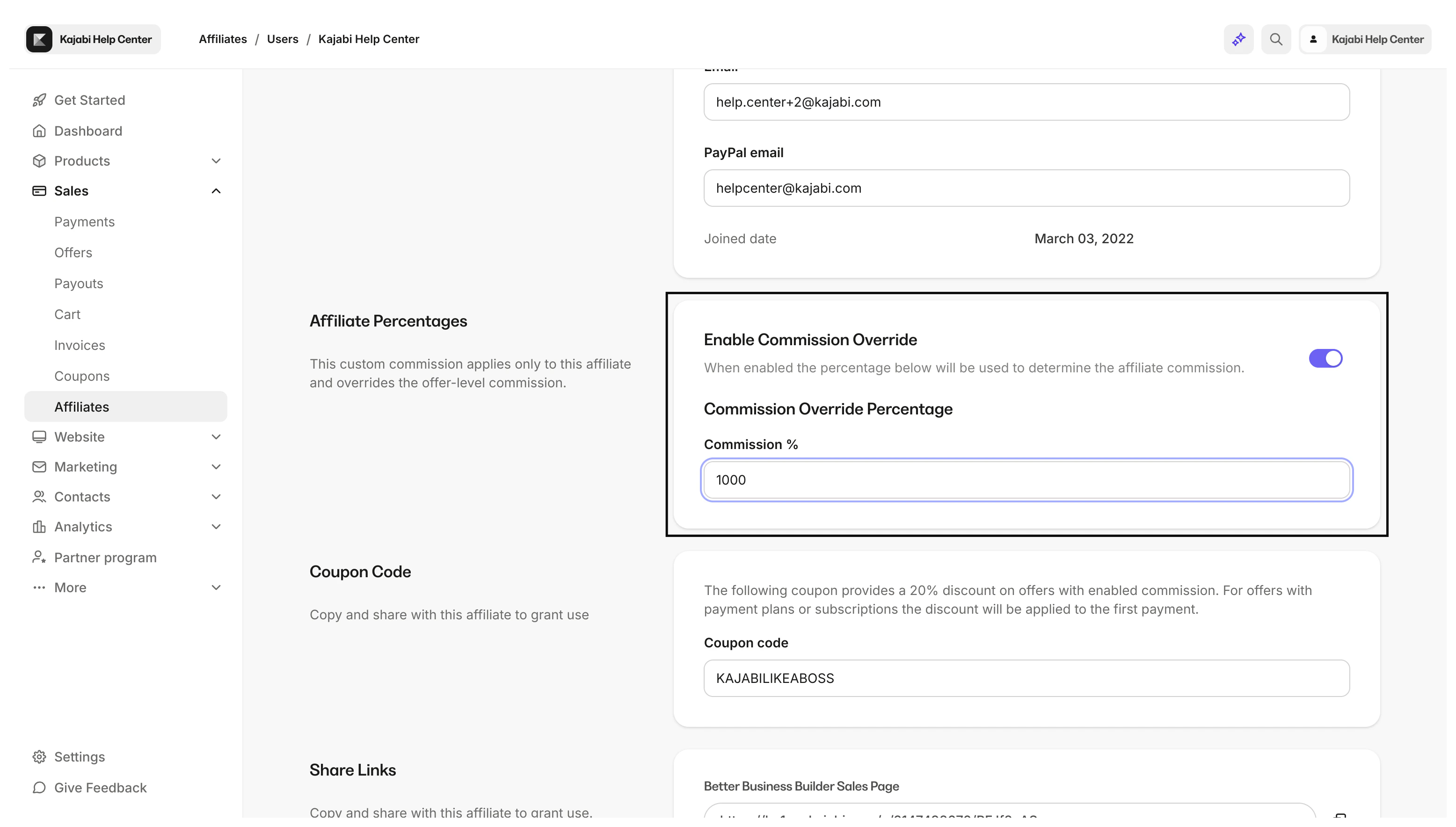
- Locate Affiliate Percentages.
- Enter your desired percentage override and click Allow affiliate’s percentage to be overridden.
Note:
Checking Allow affiliate’s percentage to be overridden will override the commission percentage specified in all Offers with Affiliate commission activated.The Affiliate Percentage will not specify the commission percentage for specific individual Offers. If left unchecked, the commission percentage specified in the Offer will determine the affiliate’s commission tracked within Affiliates.
Subscription commission tracking
When a customer makes a purchase within the conversion window after clicking an affiliate Share Link or using an Affiliate Coupon, their purchase and all subsequent subscription or payment plan payments will be attributed to the referring affiliate. By default, affiliate commissions for subscription and payment plan Offers apply for the lifetime of the customer’s subscription, and affiliates will earn a commission for every recurring payment the customer makes. Optionally, you can choose to apply commissions only to the first subscription payment. In this case, affiliates will earn a one-time commission with no future payouts.