

Overview
Have questions about the Gmail and Yahoo email requirement updates? This guide covers what’s happening, who needs to take action, and how to add a DMARC record to DNS.What’s happening?
You may have heard about the email requirements for bulk senders starting February 4, 2024. Yahoo and Gmail have separately announced updated requirements to deliver email to their platforms. Their goal is to better secure customers’ inboxes and provide an improved consumer email experience. The updated recommendations cover the following:- Ensure proper setup and authentication - For senders to Yahoo or Gmail, both mail providers require that all emails be fully authenticated with Sender Policy Framework (SPF), Domain Keys Identified Mail (DKIM), and Domain-based Message Authentication, Reporting and Conformance (DMARC).
- Make it easy to unsubscribe - To provide a hassle-free experience for users, senders must support one-click unsubscribe in the List-Unsubscribe header in the email. This does not affect the visible Unsubscribe link in the body of the email. Both mailbox providers require senders to honor the unsubscribe request within two days.
- Send emails that your subscribers want to receive - To help reduce spam in their users’ inboxes, both Yahoo and Gmail will enforce a spam complaint threshold of 0.3%. However, Kajabi enforces a complaint threshold of 0.2% to ensure email success for our Heroes. Exceeding this threshold will likely increase the number of blocked emails or emails being directed to the bulk folder.
Which email providers are implementing changes?
Google and Yahoo are adding email requirements for bulk senders starting February 2024.What do you need to do?
For our Kajabi Heroes, we are dedicated to empowering you with the tools necessary to succeed. Because of this, Kajabi has been hard at work building updates for our email tool to match the updated requirements. Therefore, the majority of our Heroes will not need to take any action, and the updates to accommodate these requirements will not impact your email deliverability through Kajabi. Additionally, your email metrics will not be impacted.If you send email from a Kajabi email domain:
You are already set up to match the updated requirements and there is nothing for you to do! All required DNS records are already in place for shared sending pools.If you send email from a custom sending domain and Kajabi controls your DNS:
There is nothing for you to do! SPF, DKIM, and PTR records are already in place, and DMARC records will be in place by February 4, 2024.Who needs to take action?
For Heroes with custom email domains who control their own DNS, there is one small action item: You will need to implement a DMARC. If this applies to you, we will reach out with a reminder. If you don’t add the DMARC record to your DNS by February 4, 2024, you will still be able to send email through Kajabi, but your custom email domain will be disabled, and your email will be sent from a shared sending pool. Not sure if you control your DNS? See below.If you send email from a custom sending domain and you control your DNS:
You will need to add a DMARC record specific to your sending domain to your DNS by February 4, 2024. Your SPF, DKIM, and PTR records are already in place. Unless you have an existing DMARC record, the following will need to be added to your DNS: Type:TXT
Name: _dmarc
Content (or Value): "v=DMARC1; p=none; rua=mailto:dmarc_kjb@kajabi.com; pct=100; rf=afrf"
(Be sure to include all special characters, e.g., "")
adkim=s:
If you have a DMARC record, without an ADKIM tag or an ADKIM tag is set to adkim=r (relaxed) and not adkim=s (strict), there is nothing more for you to do!
However, if your ADKIM tag is set to adkim=s, please reach out to our support team for assistance.
Add a DMARC record to DNS
Adding a DMARC record to DNS will vary depending on the DNS Provider. Follow the instructions for the specific DNS Provider:- GoDaddy
- CloudFlare
- Bluehost
- Namecheap
- SiteGround
GoDaddy
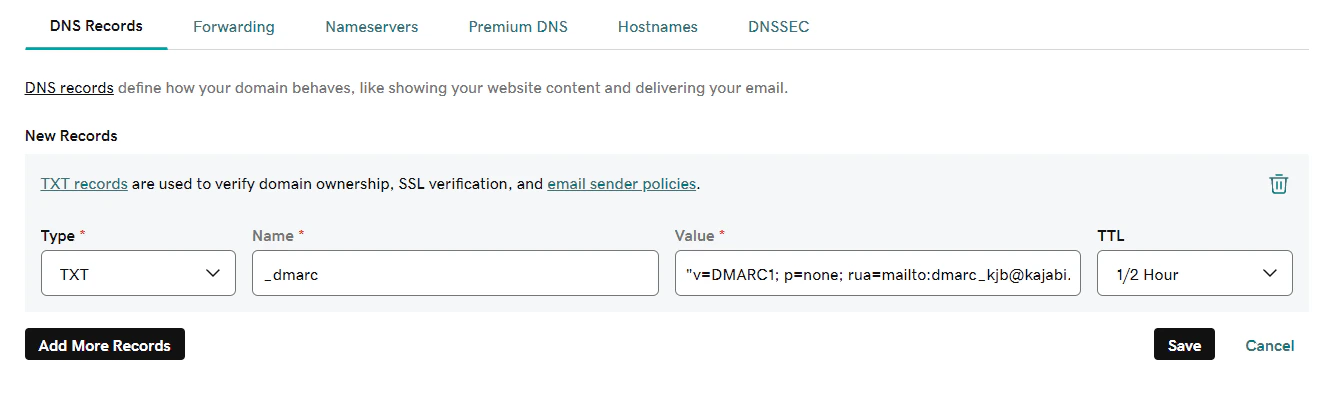
To add a DMARC record to GoDaddy, add it as a TXT record:- In your GoDaddy DNS Records, click Add and select TXT from the Type dropdown.
- Enter the Name
_dmarcinto the Name field in GoDaddy. - Enter
"v=DMARC1; p=none; rua=mailto:dmarc_kjb@kajabi.com; pct=100; rf=afrf"into the Value field in GoDaddy.
Note: Be sure to include all special characters, including quotations, apostrophes, and spaces. We recommend copying and pasting the exact value into the Value field.
- Keep the default value in the TTL field.
- Click Add record.
CloudFlare
To add a DMARC record to CloudFlare, add it as a TXT record:- Log into the CloudFlare dashboard and click into the Active domain.
- Select the DNS tab.
- Click +Add Record and select TXT from the Type dropdown.
- Enter the Name
_dmarcinto the Name field in CloudFlare. - Keep the default value in the TTL field.
- Enter
"v=DMARC1; p=none; rua=mailto:dmarc_kjb@kajabi.com; pct=100; rf=afrf"into the Content field in CloudFlare.
Note: Be sure to include all special characters, including quotations, apostrophes, and spaces. We recommend copying and pasting the exact value into the Content field.